Appendix - User Interface tips
Hide/Show Columns
Columns can be hidden or shown on various data tables in the system, such as the list of Incomplete Referrals on the main page, or the Contacts report.
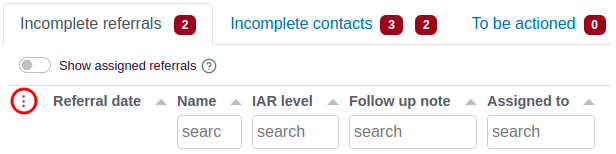
To control which columns are shown/hidden, open the pop-up menu by clicking on the three dots in the leftmost column of the table (circled in red in the example screenshot below of the Incomplete Referrals list).
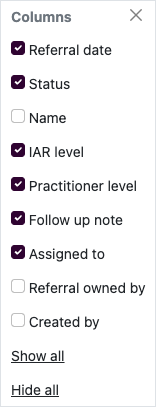
This menu lists all available columns for that table. Click a column name to hide or show a column. Click Hide all to automatically deselect all columns, or click Show all to select all the columns.
Each table's column visibility settings are stored in your web browser. If you login with the same computer and browser every day, your saved column settings will be stored indefinitely.
Responsive Screen Sizing
Did you know that you can use the Intake System on any sized screen? The screens are built so that they can be used on smartphone and tablet devices. You can securely log in and make updates when you're away from your desk or on the move.
Printing
The application is designed so that when you print a screen the navigation items are removed, so that the content of the screen is more print-friendly. Be mindful of privacy when doing so, and ensure you keep print-outs secure if they contain confidential information.